Stable Release · Windows 10 / 11

A Password-Protected
Web Browser.

Keep your personal browsing safe from anyone who uses the same computer. One master password locks your entire digital life.

🔐 Password Protected
🛡️ AES-256 Encrypted
🆓 Completely Free
👁️ Zero Tracking
💻 Windows 10 / 11
🇬🇧 English 🇪🇸 Español 🇫🇷 Français 🇩🇪 Deutsch 🇧🇷 Português 🇨🇳 中文
⬇ Download Free — No Account Needed
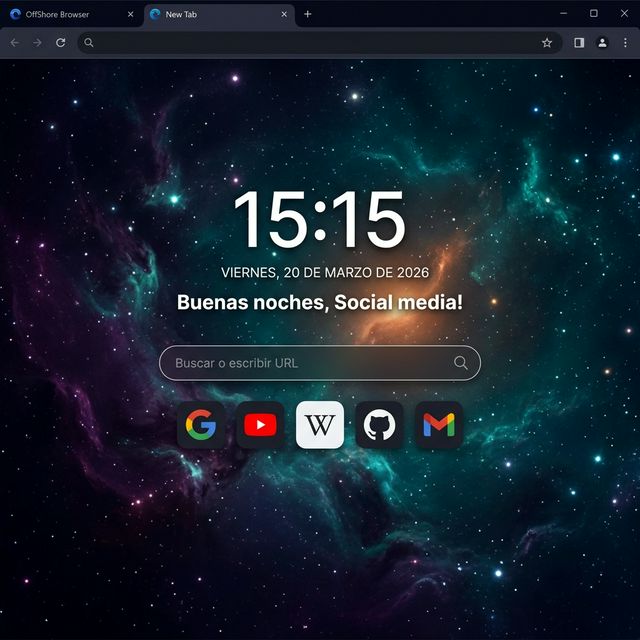
OffShore Browser - New Tab Page New Tab · Dark Theme

Everything you get

Built from the ground up for privacy without sacrificing comfort.

🔐
Multiple Encrypted Profiles
Create separate user profiles, each protected by its own master password. Switch profiles at the login screen.
🍪
Encrypted Cookies & Sessions
All cookies and browser session data are encrypted at rest using AES-256-GCM. They are decrypted only when you log in.
🕓
Encrypted History & Searches
Your browsing history and search queries are stored encrypted on disk. No one can read them without your password.
📌
Encrypted Bookmarks & Passwords
Bookmarks and saved passwords are stored in your personal encrypted vault, never in plain text.
⏱️
Auto-Lock Timer
Set an inactivity timer. After X minutes without any input, the browser locks itself automatically. Also locks on minimize.
🎨
Custom Themes
Choose from multiple dark and light themes, each with its own color palette. Your selection is saved per profile.
😴
Tab Sleeping
Inactive tabs are put to sleep to save RAM. Audio tabs are never suspended. Snapshots are used as placeholders.
🌐
6 Interface Languages
The browser interface is available in English, Spanish, French, German, Portuguese, and Chinese — switchable at any time.
🔄
Automatic Updates
The browser checks for new versions on startup. You are notified when an update is available and can download it instantly.
⚠️

How the encryption actually works

OffShore uses Vault v2 — a dual-layer encryption system that runs entirely on your device. Your master password is hashed with PBKDF2-HMAC-SHA512 (600,000 iterations) to derive a 64-byte master key, which is then split into independent domain subkeys via HKDF: one key for cookies, one for storage, one for settings, one for verification. Each encrypted blob is tagged with AES-256-GCM authentication data (AAD) that ties it to its domain — a cookie file cannot be swapped in place of a history file.

A second encryption layer with an app-level key (PBKDF2, 200,000 iterations) protects the profile metadata itself, so not even the file structure reveals your username or profile without the app context. All files use a versioned binary format with magic bytes for integrity checking.

This is not a VPN, a proxy, or a network tunnel. Your internet traffic is not routed through any server. OffShore protects what is stored on your computer — not what happens between your computer and the internet. It is a local data protection tool, not an anonymity solution.

How it works

Simple setup, powerful protection.

1
Download & Install
Choose the installer or portable version. Runs on Windows 10 and 11. No account needed.
2
Create Your Profile
Set a master password. Your encrypted vault is created locally — no data ever leaves your device.
3
Browse & Stay Protected
Your cookies, history, passwords and bookmarks are encrypted at all times. Lock with one click or automatically.

Download OffShore Browser

Free. Always. No subscription, no account required.

💿
Installer
Recommended for most users. Installs directly on your system.
~82 MB · .exe · Windows 10/11
⬇ Download Setup
📦
Portable
No installation needed. Run from a USB drive or any folder.
~115 MB · .zip · Windows 10/11
⬇ Download Portable

Contact

Questions, feedback, or bug reports? We'd love to hear from you.

You can also email us directly at [email protected]

✅ Message sent! We'll get back to you soon.